Seamless Device Transition and Enhanced AI Wallpapers in ChromeOS Update
Introduction
In a significant update for users of ChromeOS, Google has introduced features designed to enhance productivity and user engagement across devices. The new version, known as ChromeOS version 138, allows for seamless syncing of desktops across multiple devices, which is particularly beneficial for professionals who work with more than one Chromebook. Alongside this, the update brings substantial improvements to AI-generated wallpapers, providing users with unprecedented creative control over their desktop backgrounds.
Key Details
- Desktop Syncing: Users can now sync their desktops between devices, ensuring continuity in their work by maintaining open windows, tabs, and cookies.
- Target User Base: This feature is particularly aimed at professionals in sectors such as healthcare, hospitality, and manufacturing, where multiple users share devices.
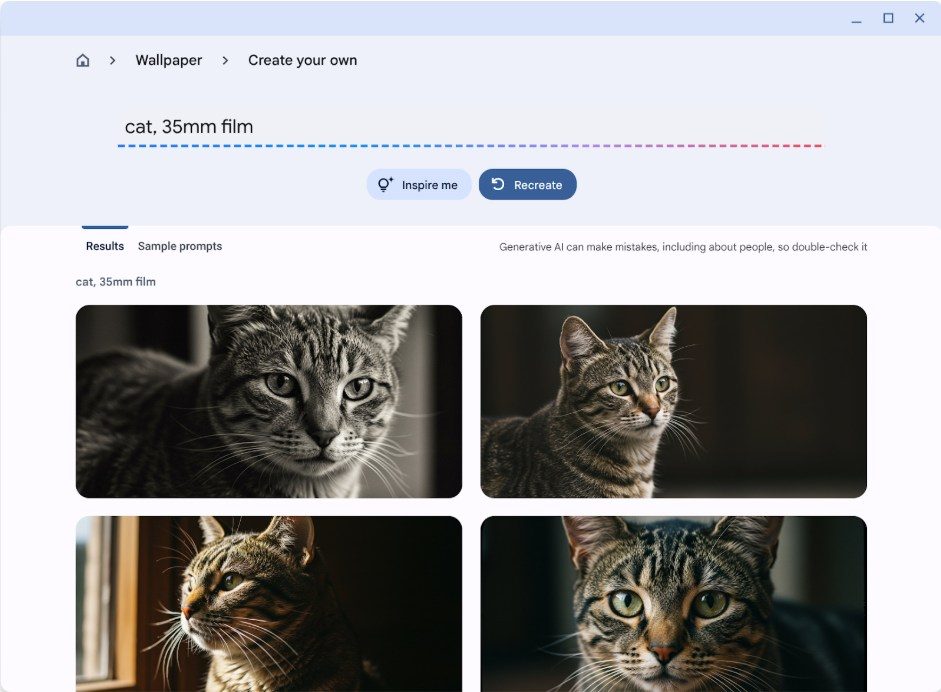
- AI Wallpapers: Enhanced AI wallpaper functionality is exclusive to Chromebook Plus models, allowing for freeform text prompts for generating custom wallpapers.
- Inspire Me Feature: For those unsure how to begin, the “Inspire me” button offers suggestions and generated wallpapers to kickstart creativity.
- New Accessibility Features: A new “Help me read” function simplifies complex texts, while all devices now support Lens for enhanced on-screen content browsing.
Background
ChromeOS has steadily evolved since its inception, transitioning from a web-centric operating system to a robust platform capable of supporting diverse applications and user needs. The introduction of Chromebook Plus models earlier this year marked a significant milestone, allowing for more powerful hardware and advanced features. The update aligns with Google’s broader strategy to cater to the needs of users who often switch between devices, thereby improving the overall user experience.
Impact Analysis
The introduction of desktop syncing in ChromeOS is poised to revolutionize how users interact with multiple devices. By allowing users to pick up right where they left off, productivity is significantly enhanced, especially in fast-paced environments. The seamless transition between devices means that important work can continue without interruption, thereby reducing potential downtime.
Furthermore, the improved AI wallpaper feature adds a creative layer to the user experience. The flexibility of freeform prompts allows users to express their preferences and creativity in ways that were previously unavailable. This shift not only personalizes the user experience but also encourages engagement with the operating system itself.
“The ability to sync desktops is a game-changer for professionals who rely on multiple devices to do their jobs effectively,” said a Google spokesperson.
Broader Context
As remote work becomes increasingly common, the need for tools that facilitate smooth transitions between devices is more critical than ever. The demand for such features is growing, as professionals seek to maximize their productivity while minimizing disruptions. Google’s update to ChromeOS is a direct response to this trend, positioning the operating system as a viable option for various industries, particularly those that require collaborative work.
Future Outlook
Looking ahead, it is likely that Google will continue to enhance ChromeOS with more features that prioritize user experience and productivity. As artificial intelligence evolves, we can expect even more sophisticated applications within the operating system, catering to the diverse needs of its user base. The focus on accessibility, as seen with the new “Help me read” feature, also indicates Google’s commitment to ensuring that all users, regardless of their technical proficiency, can benefit from its technology.
Conclusion
The latest update to ChromeOS marks an important step towards creating a more integrated and user-friendly operating system. With desktop syncing and enhanced AI wallpapers, Google is not only addressing the needs of professionals who work across multiple devices but is also enhancing the overall user experience. As we look to the future, it will be interesting to see how Google continues to innovate and adapt to the changing landscape of work and technology.