Microsoft Copilot App Integrates Office, Natural Coding, and Agentic Automation
Introduction
Microsoft continues to evolve its artificial intelligence offerings with a substantial update to its dedicated Copilot application. While the company's broader strategy regarding AI integration into Windows has seen some adjustments, the standalone Copilot app is receiving a significant overhaul. This latest iteration introduces a revamped tabbed interface, promising deeper integration with Microsoft Office applications and enhanced capabilities for natural language coding and autonomous task execution. The move signals Microsoft's commitment to making Copilot a more versatile and indispensable tool for a wide range of users, from individual consumers to large enterprises.
Key Details
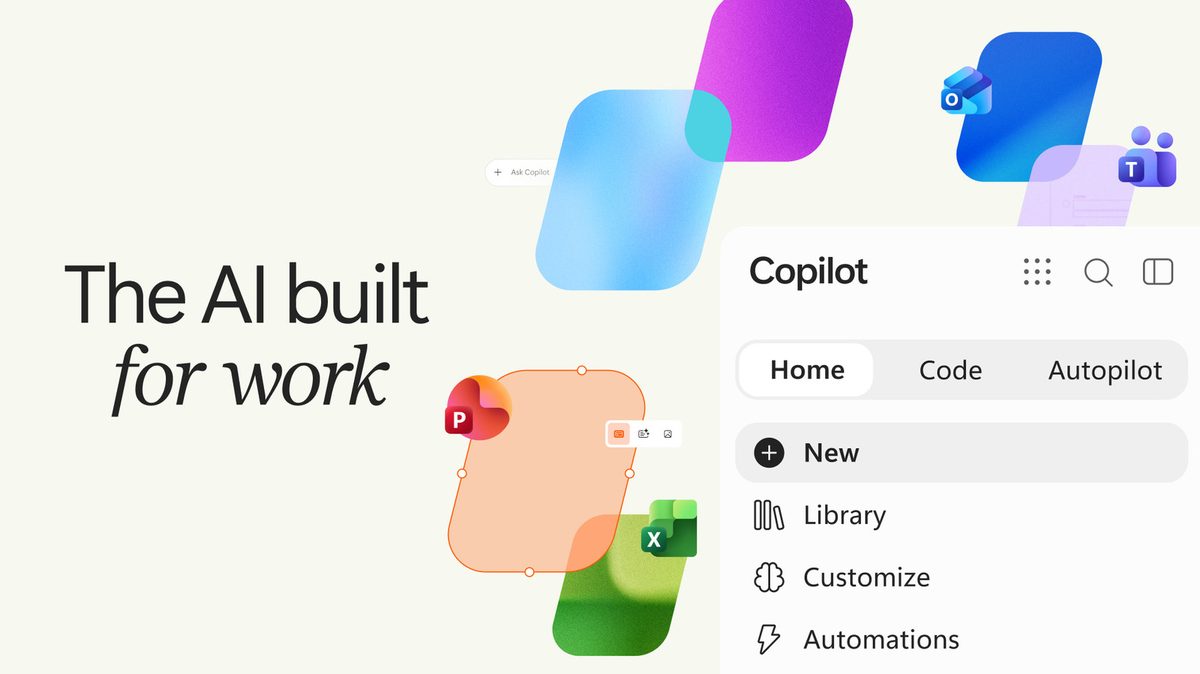
- New Tabbed Interface: The Copilot app will now feature a distinct "Home" tab for standard AI chat interactions. This section is designed to intelligently route user requests to the most appropriate Copilot mode.
- Office Integration: Direct integration with Microsoft Office applications is a core component of the update, aiming to streamline workflows involving documents, spreadsheets, and presentations.
- Natural Language Coding: A dedicated "Code" tab will allow users to generate simple applications, trackers, dashboards, automations, and workflows using natural language descriptions, eliminating the need for traditional programming skills.
- Agentic Capabilities: The new "Autopilot" tab introduces agentic features, enabling Copilot to perform complex, multi-step tasks autonomously. This includes managing entire processes like supplier reviews, from scheduling to follow-ups.
Background
Microsoft has been aggressively integrating AI, particularly its Copilot assistant, across its product ecosystem. Initially launched as a feature within Microsoft 365 and Windows, the dedicated Copilot app represents a focused effort to consolidate and enhance these AI capabilities. Earlier refreshes to the app have laid the groundwork for this more comprehensive update. The strategy appears to be balancing broad AI integration with specialized applications that offer deeper functionality. While widespread consumer adoption of AI assistants remains a work in progress, enterprise adoption is driven by the clear need for tools that can manage vast amounts of data, automate repetitive tasks, and accelerate content creation.
Impact Analysis
The integration of Office apps directly into the Copilot interface is a significant step towards making AI a seamless part of daily productivity. For businesses, this could translate into substantial efficiency gains. Imagine generating a quarterly report draft, complete with data analysis from Excel and presentation slides from PowerPoint, all initiated through a simple natural language prompt. The "Code" tab democratizes software development, allowing individuals without coding expertise to create custom tools and automations. This could empower small businesses and individual users to build bespoke solutions tailored to their specific needs. The "Autopilot" tab, with its agentic capabilities, represents the most ambitious aspect of the update. By enabling Copilot to manage entire workflows autonomously, Microsoft is positioning its AI as a proactive assistant capable of handling complex operational tasks, freeing up human workers for more strategic activities.
Broader Context
This update places Microsoft Copilot in direct competition with other AI-powered productivity tools and platforms. The emphasis on natural language coding and autonomous task management aligns with broader industry trends towards low-code/no-code solutions and intelligent automation. As AI becomes more capable, the distinction between a simple chatbot and a sophisticated digital assistant blurs. Microsoft's strategy appears to be leveraging its existing dominance in the enterprise software market, particularly with Office 365, to embed its AI assistant deeply into workflows where it can provide the most immediate value. The success of this strategy will depend on Copilot's ability to deliver reliable, secure, and genuinely helpful assistance that goes beyond basic query responses.
Future Outlook
The future of Copilot likely involves even deeper integration across Microsoft's entire product suite, including its cloud services, gaming division, and potentially even hardware. The development of agentic capabilities suggests a long-term vision where AI assistants can operate with increasing autonomy, managing complex projects and adapting to evolving user needs. As AI technology matures, we can expect Copilot to become more personalized, predictive, and proactive. The challenge for Microsoft will be to maintain user trust and address concerns around data privacy and security, especially as the AI takes on more critical tasks. Continued innovation in areas like multimodal AI, which can understand and generate text, images, and code, will also be crucial for Copilot's long-term relevance.
Conclusion
Microsoft's latest update to its Copilot app marks a significant evolution, moving beyond simple conversational AI to offer integrated productivity tools, accessible coding capabilities, and powerful autonomous task management. By focusing on tangible use cases within Office and introducing agentic features, Microsoft is making a strong case for Copilot's utility in both business and potentially consumer environments. This strategic enhancement aims to solidify Copilot's position as a central pillar of Microsoft's AI strategy, promising to reshape how users interact with technology and manage their digital workloads.
Source: engadget.com